Starting a lawful and transparent business is one of the smartest steps any entrepreneur can take toward financial independence and long-term success. The United States LLC formation process has become increasingly popular for international entrepreneurs due to its low cost, strong legal protection, and simple online registration system.
Forming a U.S. LLC ensures your business operates under recognized legal standards, giving you complete control, flexibility, and peace of mind. Whether you are living in the U.S. or managing your business from abroad, this step-by-step LLC registration guide will help you understand how to register your company, file the required documents, and receive your official approval online.
By following the proper LLC formation process, you’ll build a business that’s legally secure, compliant, and ready for global opportunities. Let’s explore how you can start your U.S. LLC the right way — quickly, affordably, and confidently.
Watch the complete step-by-step tutorial below to see exactly how to register an LLC online, choose the right state, and complete the formation process from start to finish.
A Personal Note from the Founder: “I am a non-US resident. I spent years looking for a trustworthy partner and tested four different companies for myself and my clients. I ultimately chose Registered Agents Inc for my own businesses. In my experience, they were the only provider that gave me a clear, flat rate with no monthly fees for a business address. I still use them today for my annual compliance because the process is headache-free. I wrote this guide to save you the time and stress I went through.”
Why I Avoid “$0” Filing Services: You will often see ads for “$0 Entry Fees.” Be careful. In my experience, these low starting prices often lead to higher costs later, such as recurring subscriptions for essential documents or monthly fees for a business address.
Step 1: Start the Registration Process
- Get Started from here first.
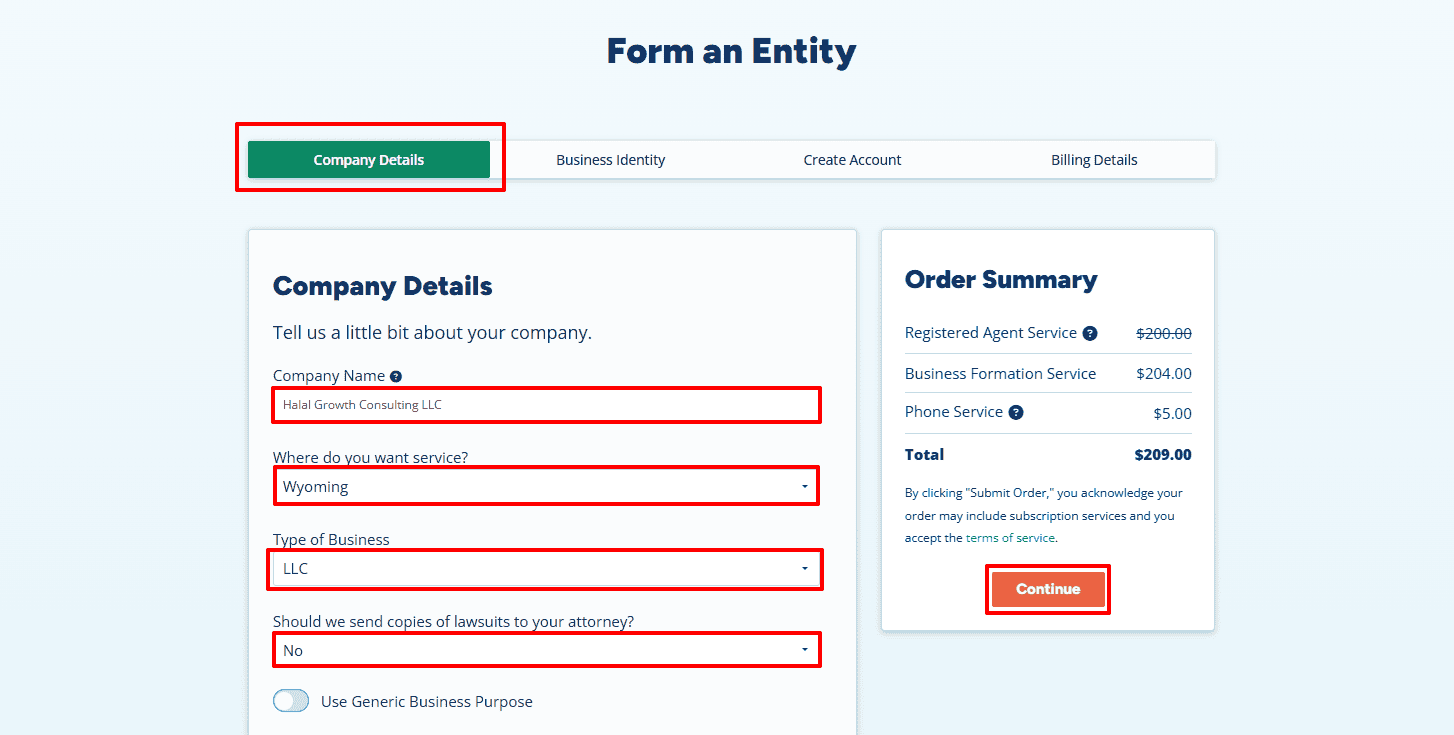
- Once you click the link, the registration form will open. Begin by entering your Company Name — in this example, “Halal Growth Consulting LLC.”
- Next, select the State where you want to form your LLC. Most entrepreneurs choose Wyoming for its privacy benefits and simplicity, but you can choose any state according to your needs.
Note: This example uses Wyoming. If you choose a different state, replace “Wyoming” with your selected state name. - Now choose your Business Type as LLC.
- When asked if you want to send copies of lawsuits to your attorney, select No to keep things simple.
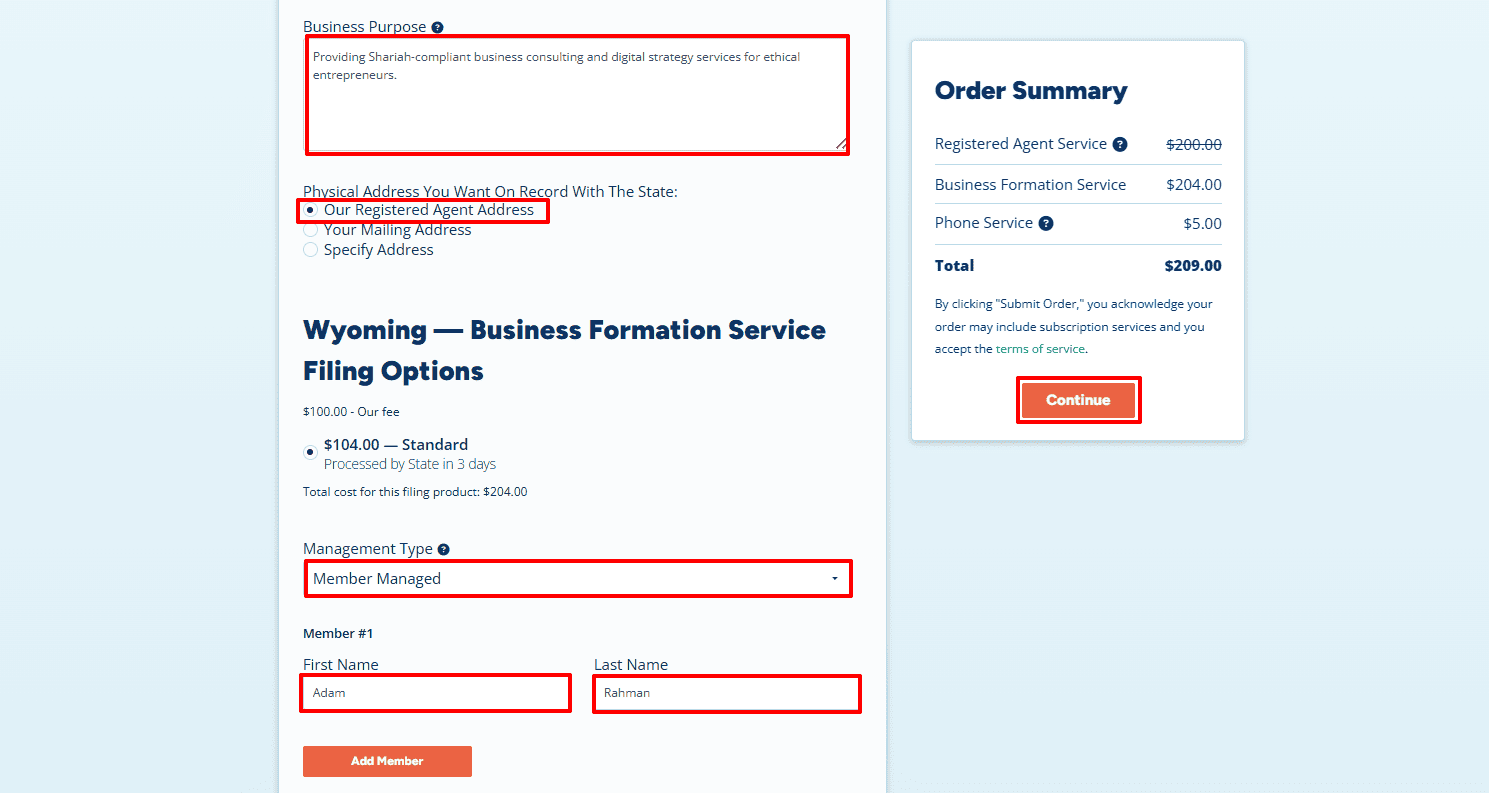
- Enter your Business Purpose (within 500 characters). For example: “Providing Shariah-compliant business consulting and digital strategy services for ethical entrepreneurs.”
- In the Physical Address section, select Our Registered Agent Address if you don’t have a local address in the state or prefer not to display your own address on public documents. If you already have an address in that state, you can select Your Mailing Address and enter it manually.
- Under Management Type, select Member-Managed if you want the owners to manage the business directly. Alternatively, choose Manager-Managed if your company will have appointed managers.
- Finally, enter the Member Name — for example, Adam Rahman — and click Continue to move to the next step.
Step 2: Add Business Phone and Additional Items
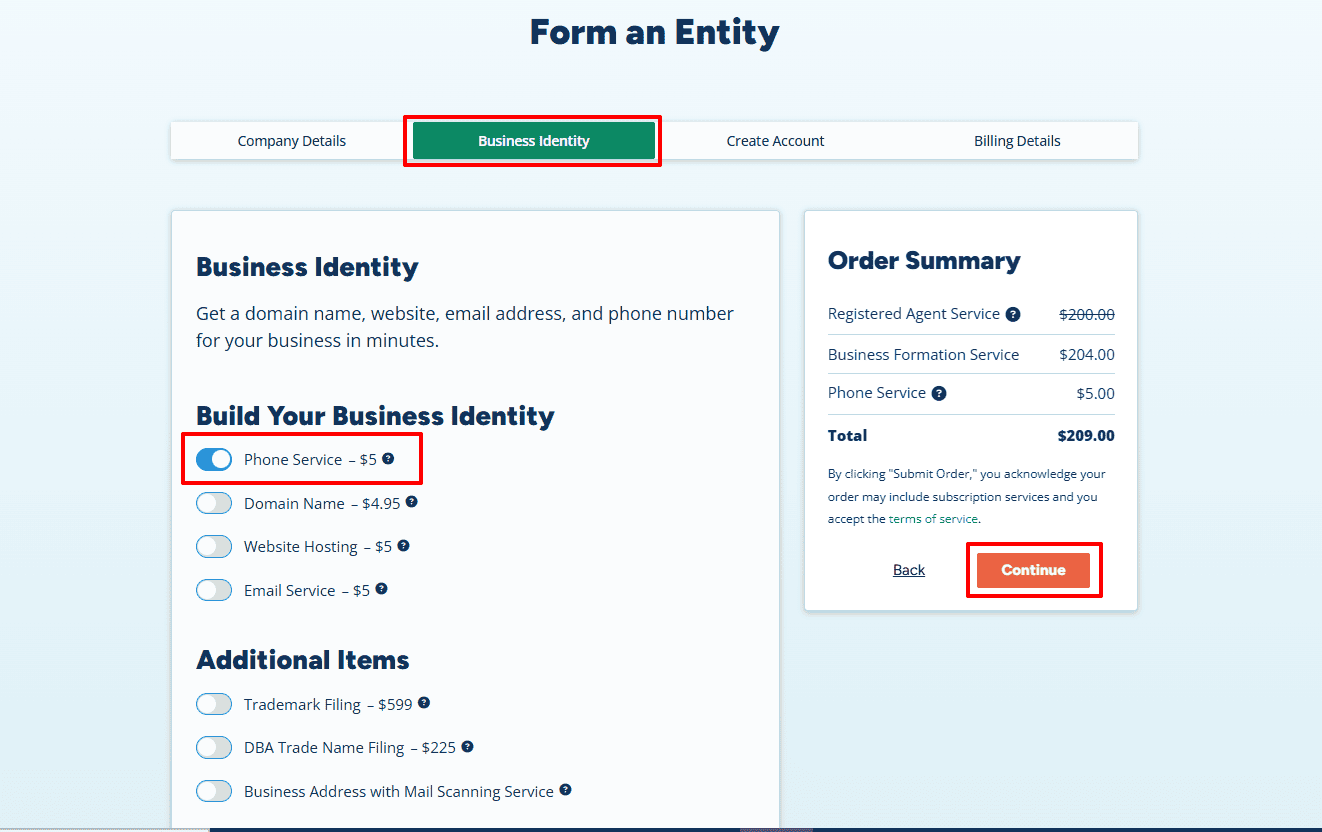
- In this section, you can enhance your business identity. If you need a U.S.-based business phone number, toggle Phone Service – $5 to enable it. You can also explore optional add-ons such as Domain Name, Website Hosting, or Email Service to strengthen your professional presence.
- Once done, click Continue to proceed.
Step 3: Contact Information and Create Login Credentials
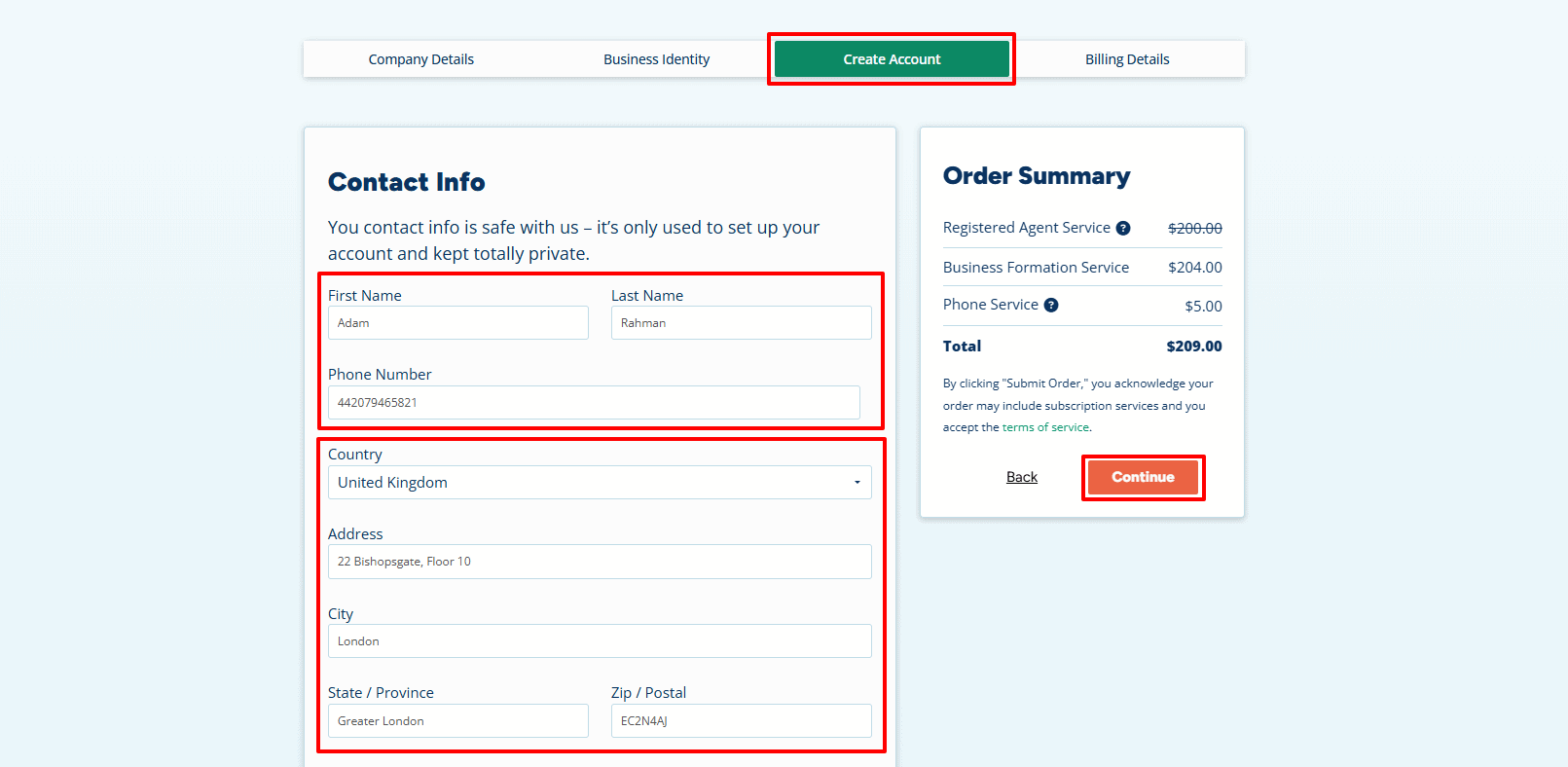
Now fill out your Contact Information accurately. Enter your full name, international phone number, and your complete address as it appears on your official ID.
For example:
- Name: Adam Rahman
- Phone Number: 44 20 7946 5821
- Country: United Kingdom
- Address: 22 Bishopsgate, Floor 10, London, Greater London, EC2N 4AJ
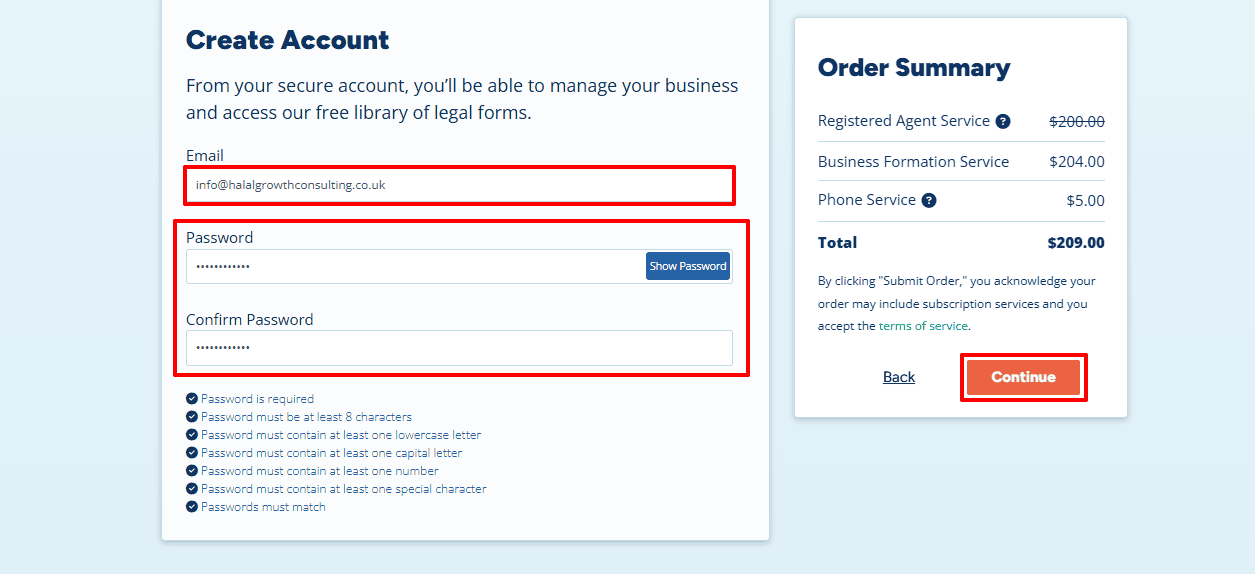
- Next, enter your Email Address (e.g., info@halalgrowthconsulting.co.uk) and create a strong password. Confirm your password, ensuring it meets all security requirements. Keep these login credentials safe, as you’ll use them to access your Registered Agent dashboard anytime.
- Click Continue to proceed.
Step 4: Payment Details
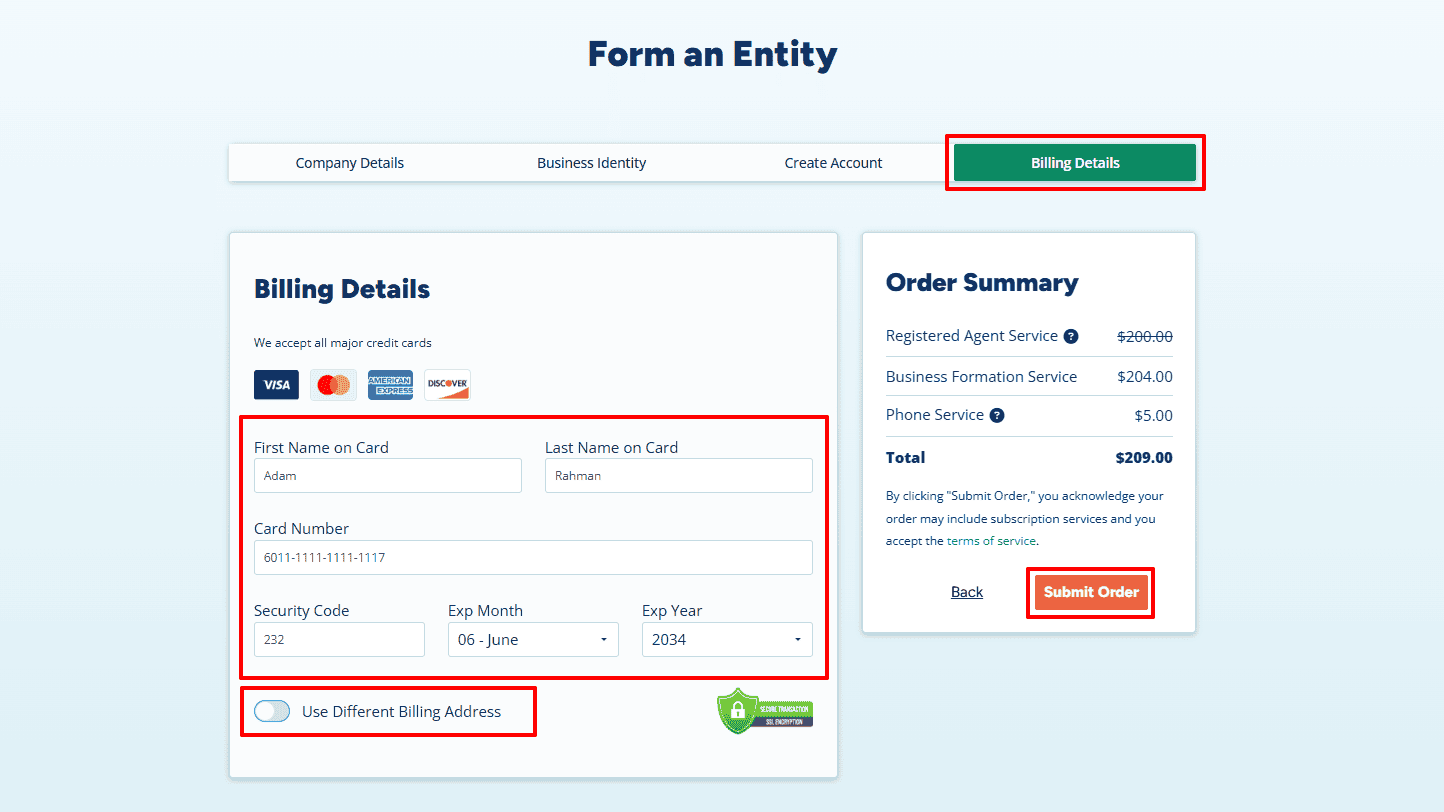
- On the Billing Details page, enter your cardholder name, card number, CVV (security code), and expiration month and year. You can keep the same billing address or select “Use Different Billing Address” if needed.
- After confirming the details, click Submit Order to finalize the payment securely. The system uses encrypted SSL technology to keep your financial data protected.
Step 5: Review Information & Add EIN or TAX ID
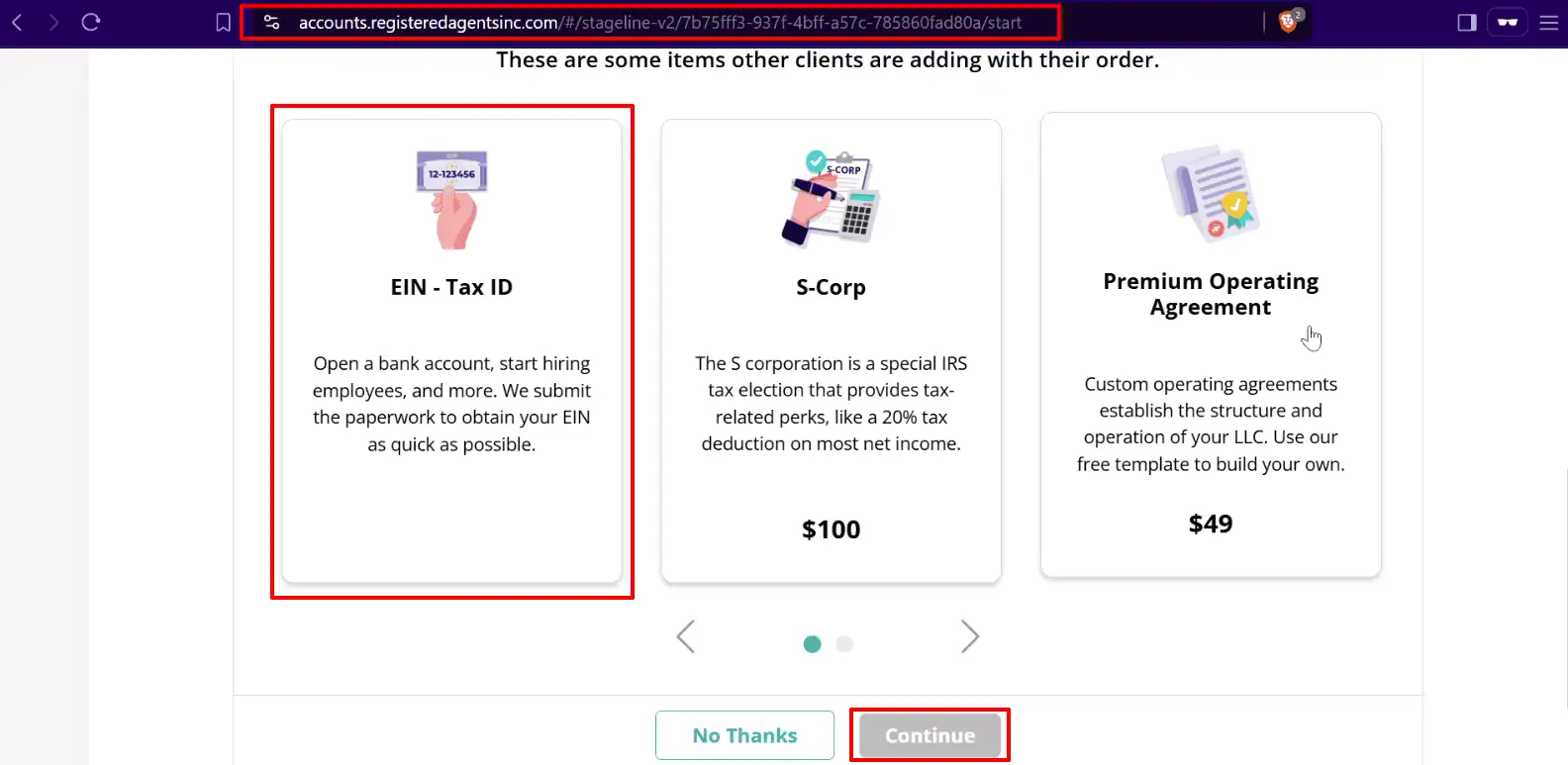
After payment, you’ll be redirected to the next screen where you can review all your details and add your EIN or TAX ID. Verify your business name and address carefully.
- You can add an EIN (Employer Identification Number) to your order — this is required to open a U.S. business bank account or hire employees. If you already have a Social Security Number (SSN), obtaining an EIN costs $50. If you don’t have an SSN, the EIN service is $200.
- Once added, click Continue to confirm.
Step 6: Final Submission
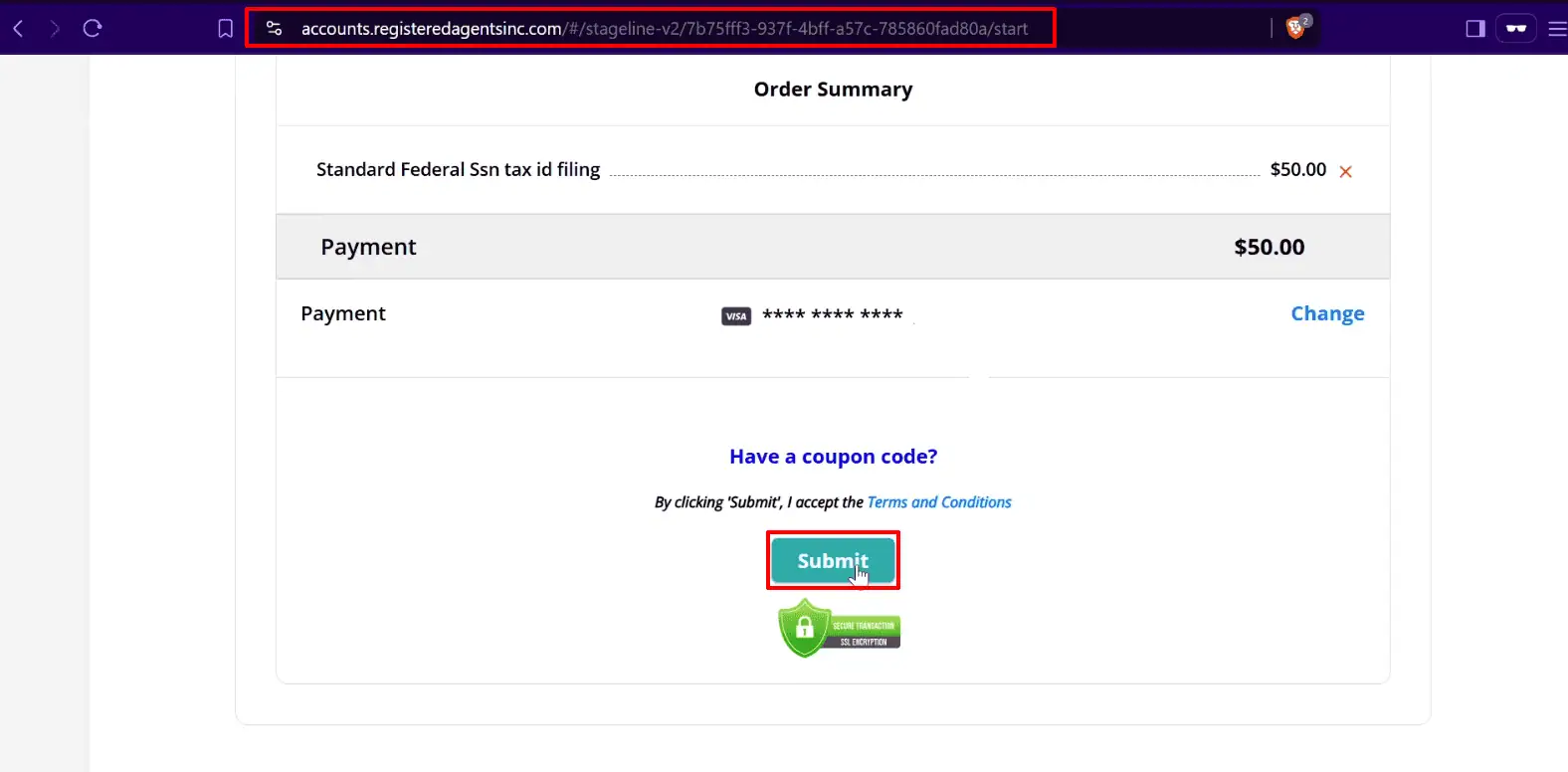
- After completing all steps, click Submit Order once again. Your LLC application will now be officially filed. Within a few days, your chosen state will approve the formation, and the IRS will assign your EIN. You’ll receive an email confirmation along with dashboard access to manage your documents and compliance updates.
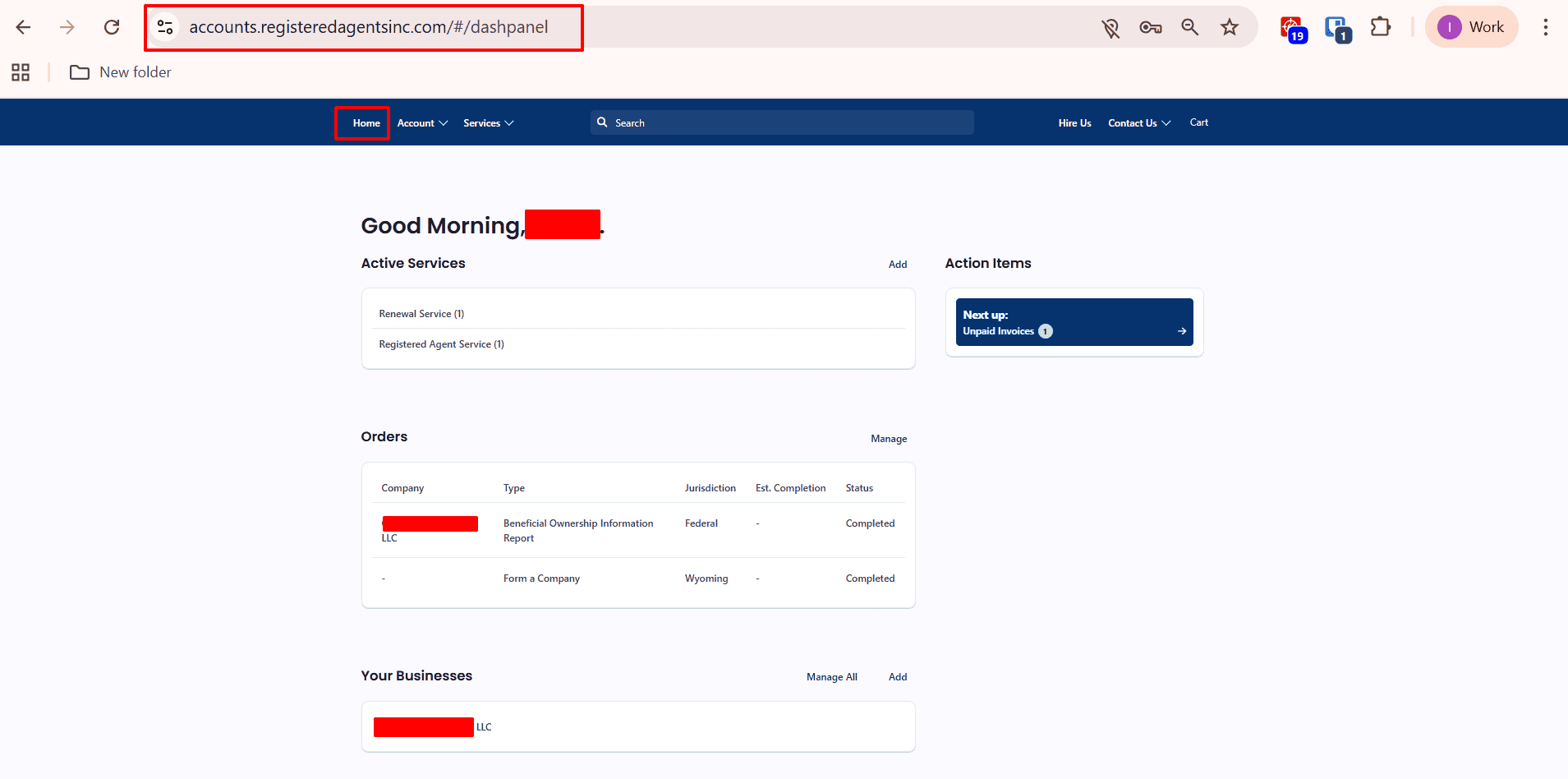
Step 7: Dashboard Home Page
After approval, you’ll be redirected to your Registered Agent Dashboard. This is your secure home for managing your LLC. Here, you can see your Active Services, Orders, and Compliance Alerts at a glance. You can also renew services, track pending filings, and access customer support. The dashboard helps Muslim entrepreneurs manage their LLCs transparently and in full accordance with U.S. law and Halal business ethics.
Step 8: Documents Page
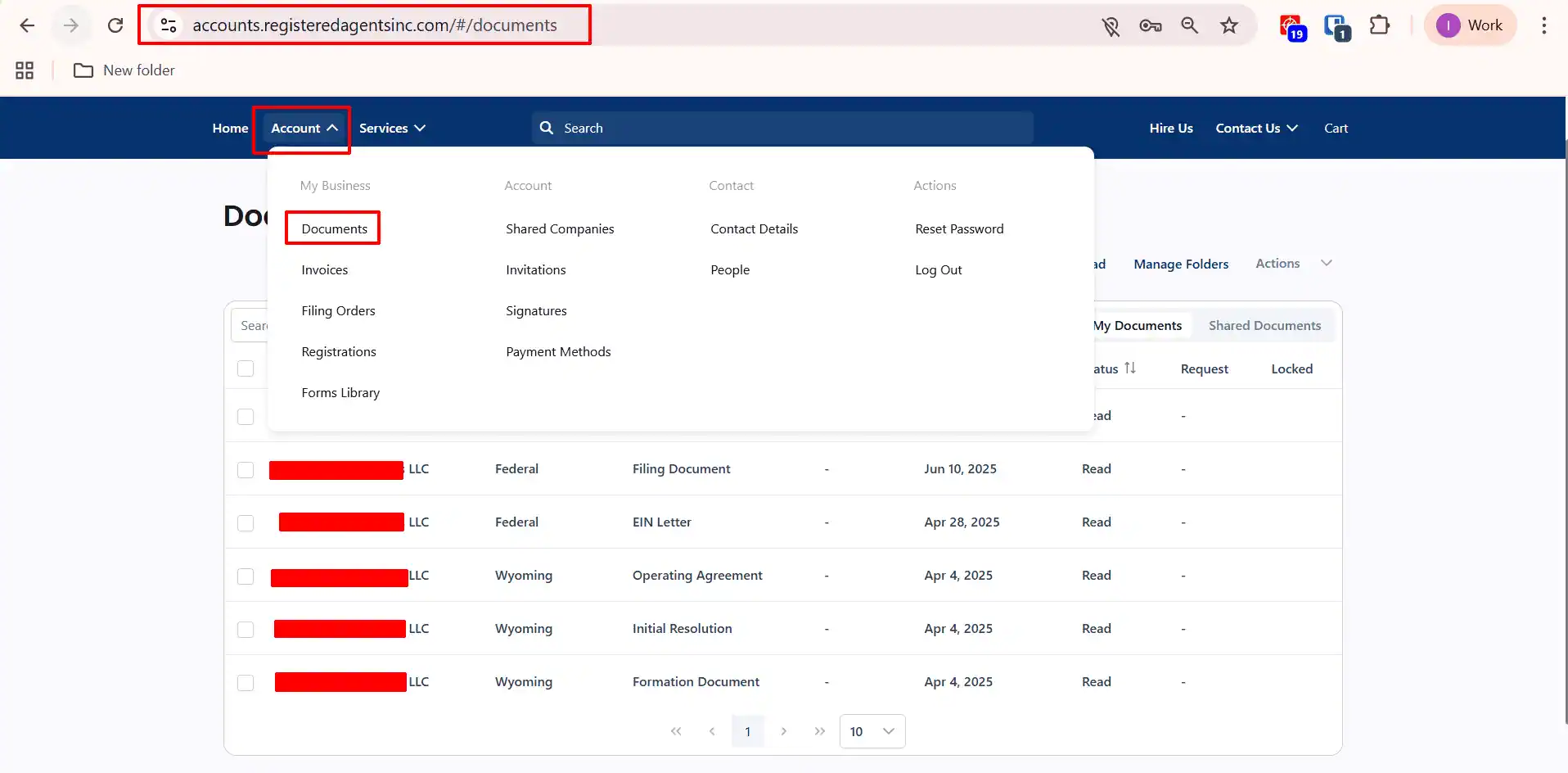
Once your LLC is approved and your EIN is issued, all official formation documents will appear under the Documents tab in your dashboard. Here you’ll find: LLC Formation Certificate, EIN Letter, Operating Agreement, Initial Resolution etc. These documents can be downloaded anytime securely. You can access them whenever you need to open a bank account, payment gateway, any merchant accounts or prove ownership.
Next Steps for Your New LLC:
Congratulations! You have successfully formed a US company from the comfort of your home.
- Wait for the EIN: This can take few business days depending on IRS backlog for non-residents. Though the IRS’s official timeframe is only 1-4 business days.
- Open a Bank Account: Use your new LLC documents and EIN to apply for a business account. For non-residents, I highly recommend Mercury Bank because they allow you to open an account remotely without visiting the US.
- Set Up Payments: Connect your US bank account to Stripe to start accepting payments from customers globally.
- Build Your Website: For a fast AI-powered website builder that works great for US businesses, I recommend Hostinger. They also provide quality web hosting and .com domains.
Ready to start?
Launch Your LLC with Registered Agents Inc.
Disclaimer: LLCTutor.com is an educational platform and does not provide legal or financial advice. We promote lawful and ethical business practices in line with Islamic principles. We do not support unlawful activities, deceptive practices, gambling, interest-based business models, or arrangements that lack real ownership, responsibility, or commercial risk. Viewers are responsible for ensuring their activities comply with applicable laws and ethical standards. And some links in this description are affiliate links. This means if you click on them and purchase a service, I may receive a small commission at no extra cost to you. I only recommend services I have personally used and trust. This helps support the blog/channel so I can continue to make free content like this!