Are you trying to start an Amazon FBA business or use Stripe to accept international payments, but keep getting rejected because you live outside the USA?
You are not alone. Thousands of entrepreneurs from Asia, Europe, the Middle East, and Africa face this exact roadblock. You have the skills, but you lack the financial infrastructure.
The solution is not a VPN or a fake address—that will get you banned. The only long-term, legitimate solution is opening a US Limited Liability Company (LLC).
A US LLC acts as your “financial passport.” It allows you to legally obtain a US EIN (Tax ID), open real US business bank accounts (like Mercury or Relay), and verify your Amazon Seller Central account without living in America.
In this guide, we will show non-residents the exact, step-by-step process to build an “Amazon-Ready” LLC infrastructure that actually works.
Why Amazon FBA Sellers Need a Specific Setup
If your goal is just to own a US company, any generic setup will do. But if your goal is to get verified on Amazon FBA and Stripe, you need to be careful.
Amazon’s verification bots are aggressive. If they suspect your business address is a cheap “virtual PO Box” used by thousands of others, they will flag your account.
The “Amazon-Ready” Infrastructure requires three things:
-
A Clean US LLC: Registered in a business-friendly state.
-
A Unique Address Strategy: Ensuring your address doesn’t trigger “Section 3” verification issues.
-
A US Bank Account: To receive USD payouts without massive currency conversion fees.
Below, we walk through the exact process we use for international founders.
Watch the complete step by step tutorial below to see exactly how non-US founders set up a US LLC for Amazon FBA, Stripe payments, and US business banking.
A Personal Note from the Founder: “I am a non-US resident just like you. I spent years looking for a trustworthy partner and tested four different companies for myself and my clients. I ultimately chose Registered Agents Inc for my own businesses. In my experience, they were the only provider that gave me a clear, flat rate with no monthly fees for a business address. I still use them today for my annual compliance because the process is headache-free. I wrote this guide to save you the time and stress I went through.”
Why I Avoid “$0” Filing Services: You will often see ads for “$0 Entry Fees.” Be careful. In my experience, these low starting prices often lead to higher costs later, such as recurring subscriptions for essential documents or monthly fees for a business address.
Step 1: Start the LLC Registration Process
To begin, you need to visit the formation portal from here.
Then, fill out the details as shown below:
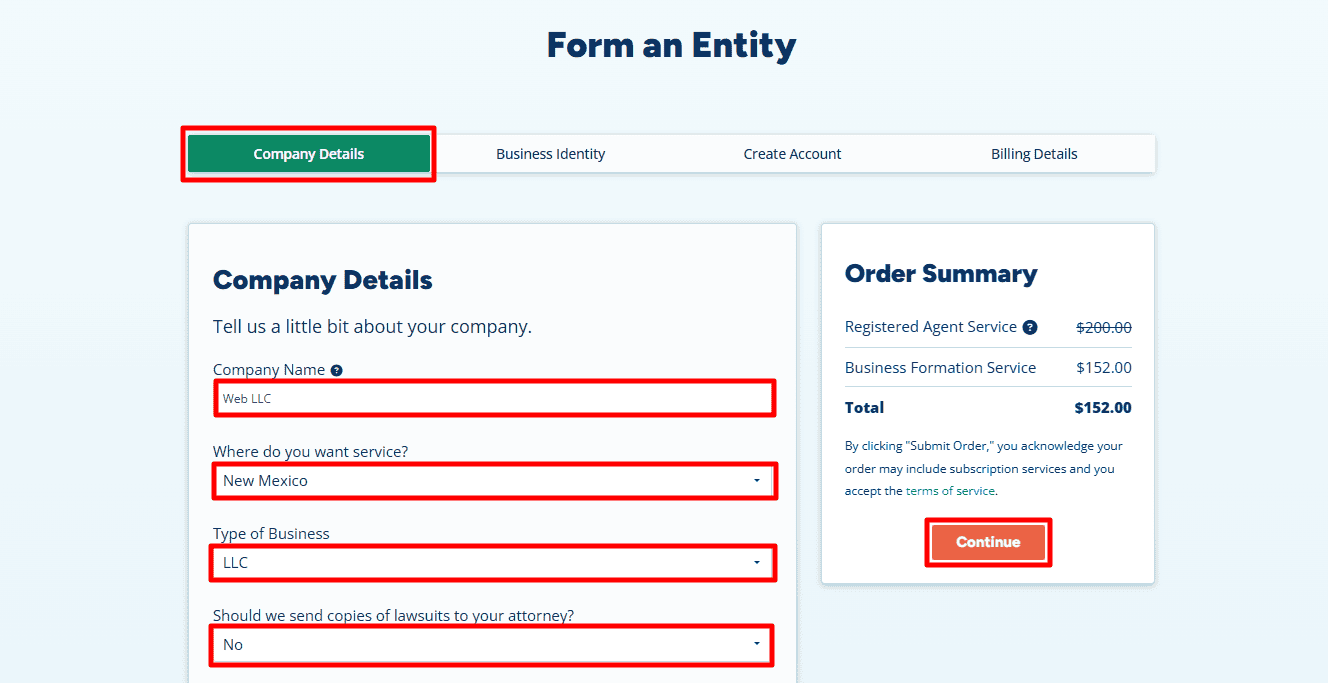
- Company Name: Enter your desired business name. In our example, we used “Web LLC”.
-
State: Select New Mexico.
-
Why New Mexico? For non-US residents, New Mexico is the “Hidden Gem.” It offers $0 annual reporting fees, high privacy (your name isn’t on the public record), and no state income tax for non-residents.
Note: If you prefer a different state (like Delaware or Wyoming or any other), you are free to select it from the menu.
-
- Type of Business: Select LLC.
- Lawsuit Copies: Select “No” (unless you have a specific legal reason otherwise).
-
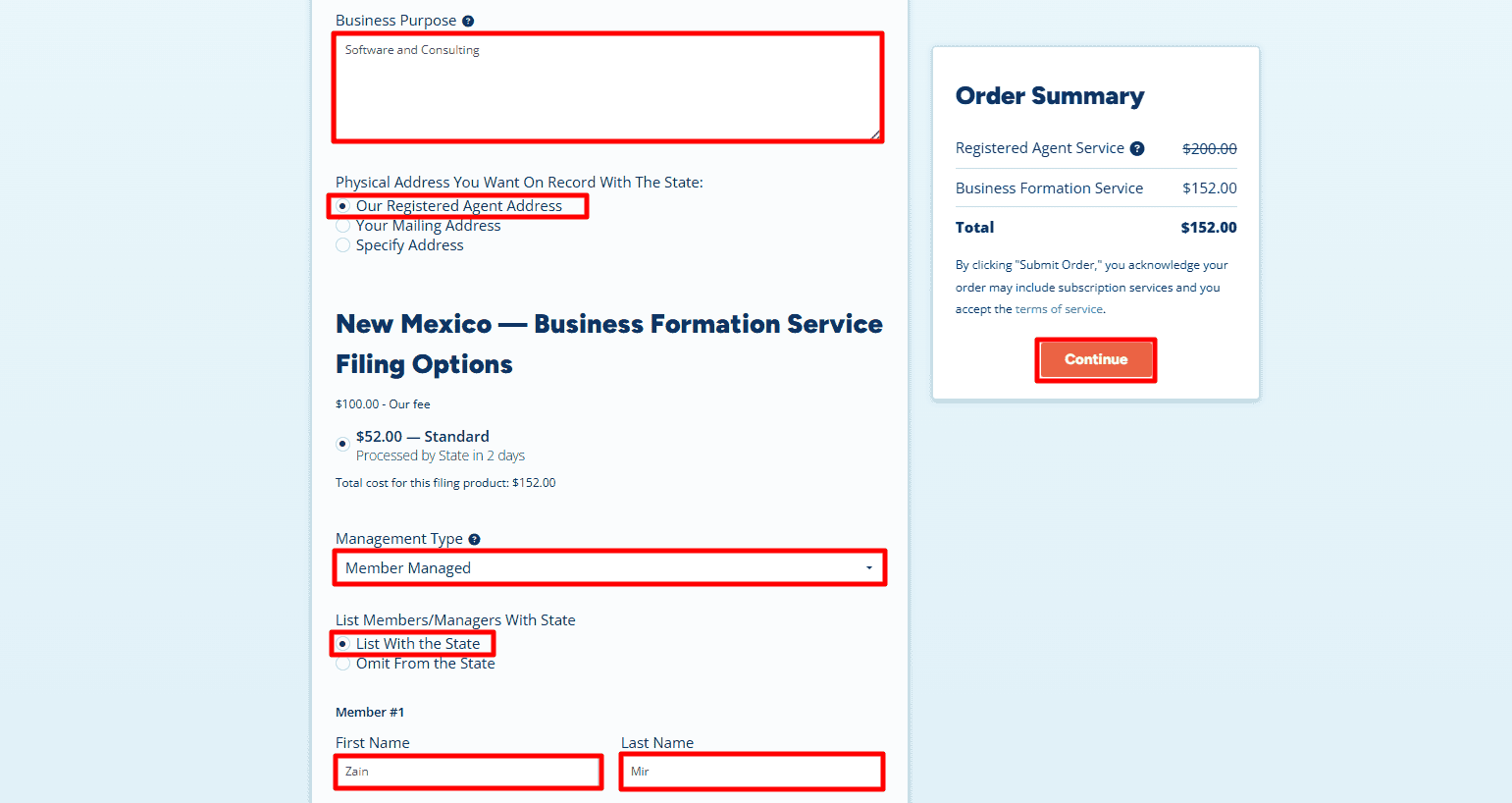
Business Purpose: Write a brief sentence about what you do.
-
Example: “Software and Consulting” or “E-commerce sales.”
-
- Physical Address: Select “Our Registered Agent Address”.
Critical: We recommend using the Registered Agent Address to keep your personal details off the public record. This is also required if you don’t actually live in the state. However, if you already have a valid local address in New Mexico (or the state you selected), you can choose Your Mailing Address to enter it yourself. - Management Type: Choose Member-Managed (this means you, the owner, run the business).
- Member Name: Enter your full name (e.g., Zain Mir).
- Click “Continue”.
Step 2: Add Business Phone and Additional Services
-
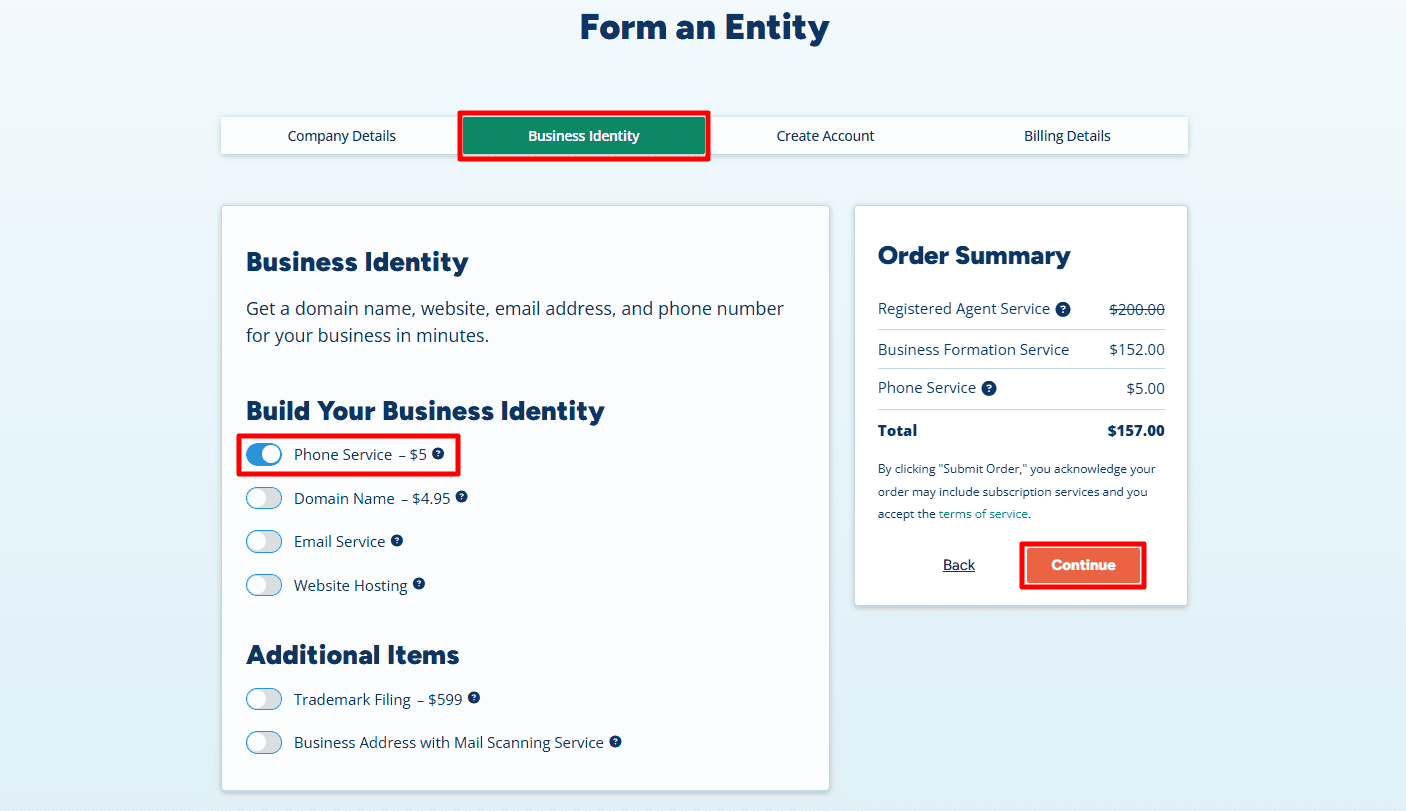
Phone Service ($5/month): We highly recommend adding the Business Phone Service.
-
Why? A U.S. phone number is strongly recommended for opening U.S. business bank accounts such as Mercury or Relay, and it is required for OTP verification when using Amazon Seller Central. Getting it here is cheaper and easier than trying to verify a VoIP number later.
-
- Optional: You can also add optional services like a Domain Name or Business Email to professionalize your brand.
- Click “Continue”.
Step 3: Contact Information & Login
-
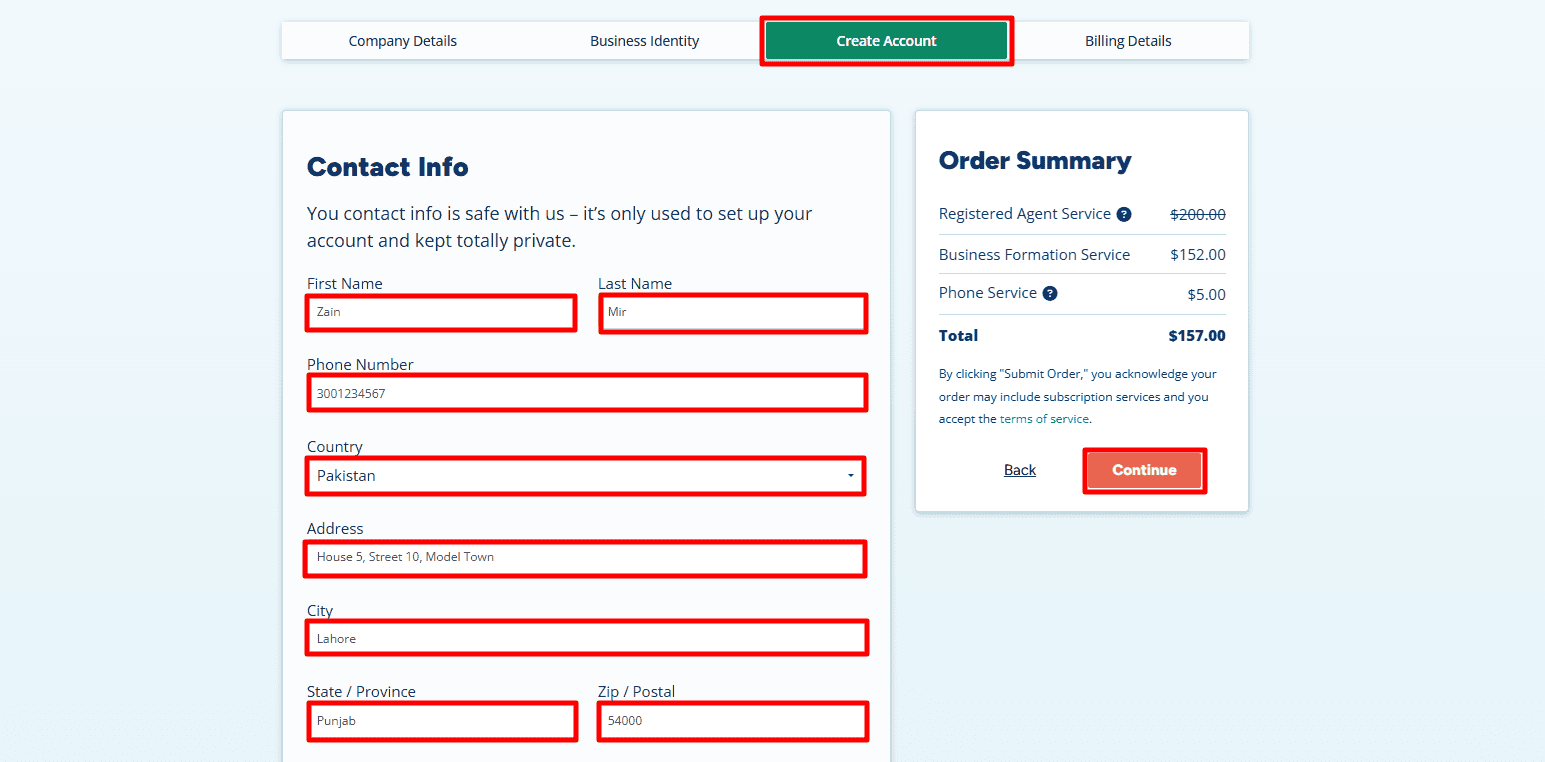
Contact Info: Enter your name and home country or residential address exactly as they appear on your official ID/Passport.
-
Note: As shown in the example, “Zain Mir” is using his actual international address in Lahore, Pakistan (House 5, Street 10, Model Town). This information is for the Registered Agent’s internal billing only and is not made public.
-
- Phone Number: Enter your international mobile number so they can reach you if needed.
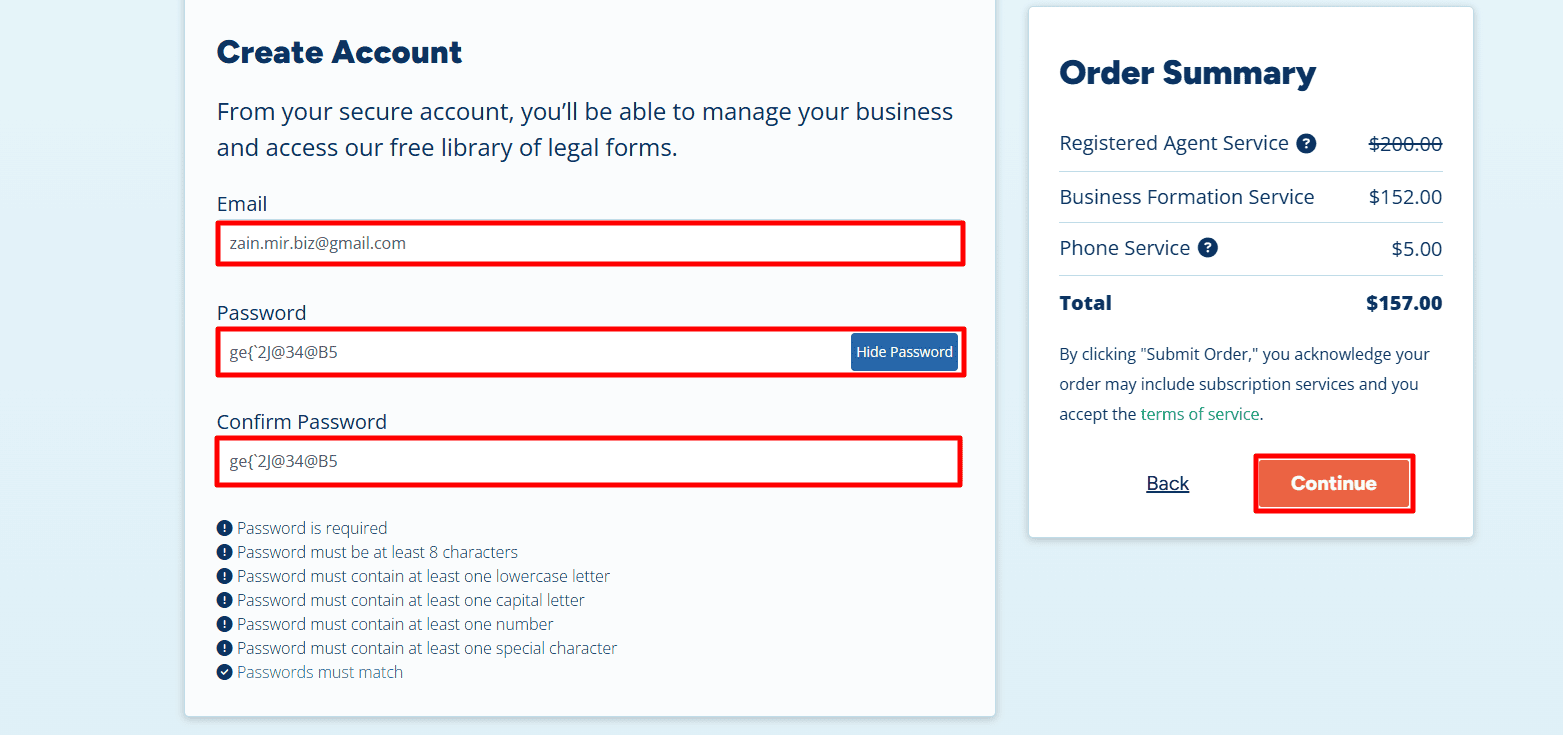
- Create Account: Enter your email (e.g., zain.mir.biz@gmail.com) and create a strong password. You will use this to log into your dashboard later to access your documents.
- Click “Continue”.
Step 4: Payment Details
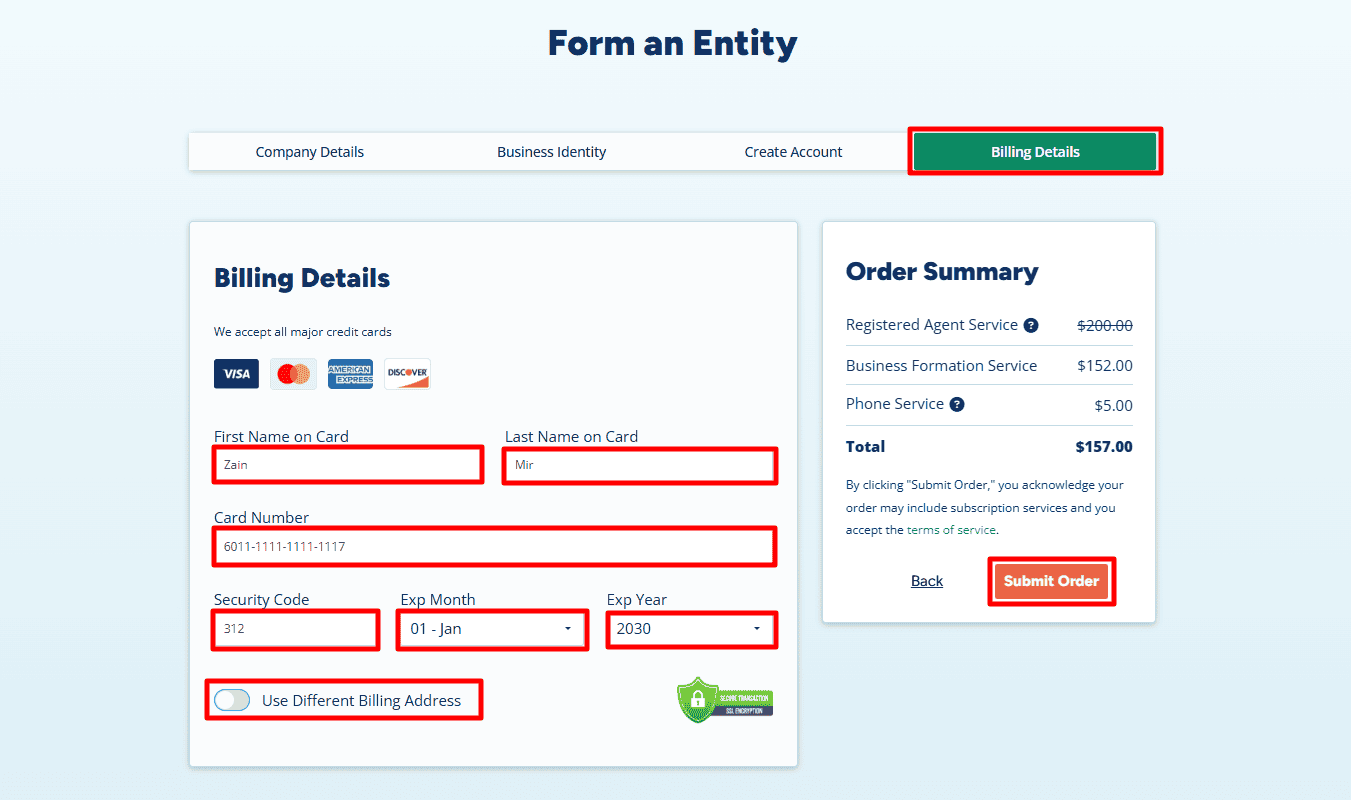
- Review your order summary. You will notice that by using this specific portal, you get a clear, upfront price (usually around $152 – $157 for New Mexico, covering state fees and service).
- Enter your credit/debit card details. You can use an international card from your home country (Pakistan, India, etc.).
- Click Submit Order.
Step 5: The EIN (Tax ID) – Critical for Banking
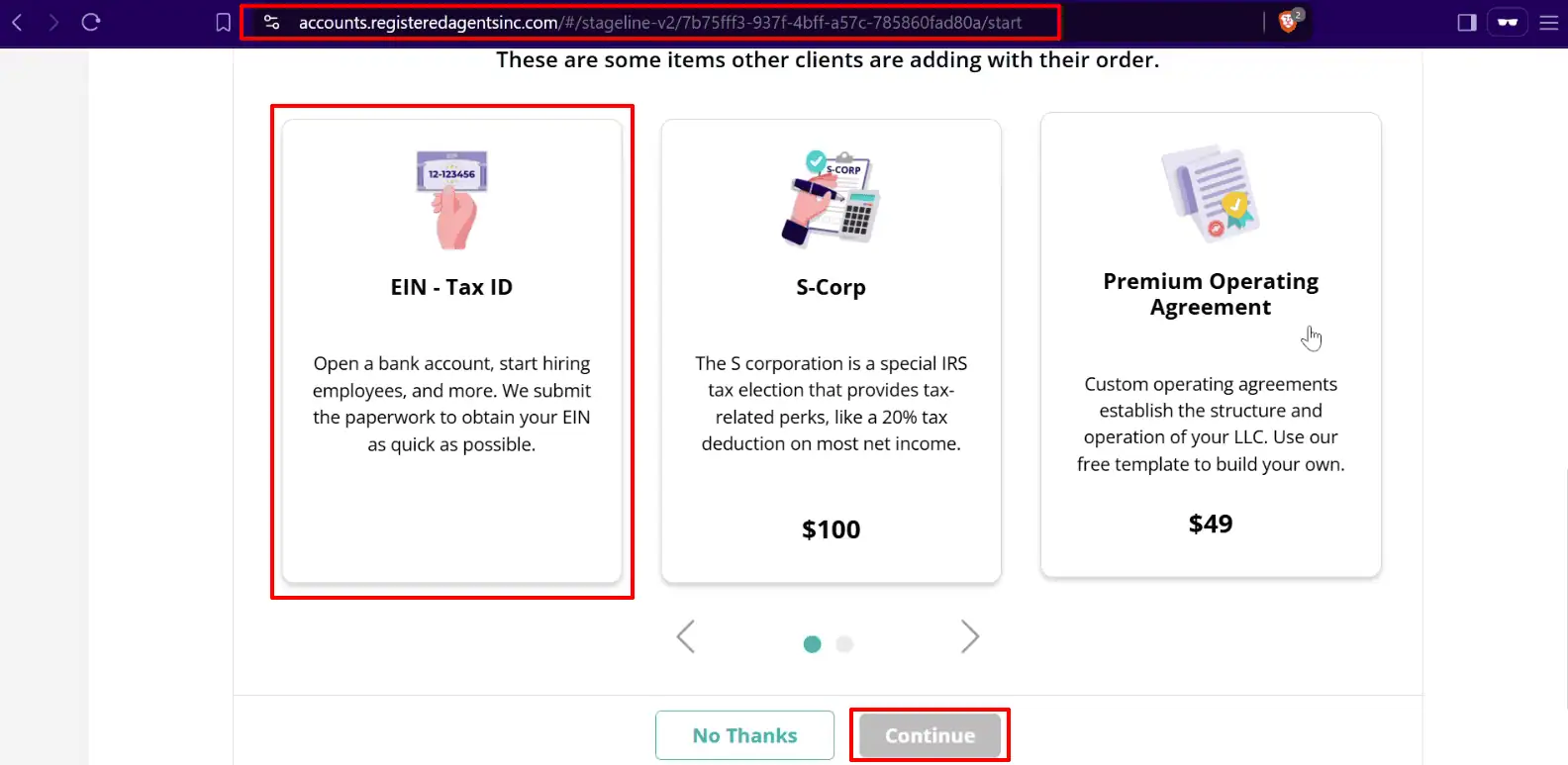
After payment, you may see an option to add the EIN (Employer Identification Number).
-
The EIN is like a Social Security Number for your business.
-
You cannot open a US bank account without EIN.
-
Action: If you don’t want to deal with IRS fax forms yourself, add the EIN – Tax ID service to your order. It saves you weeks of hassle.
Step 6: Final Submission
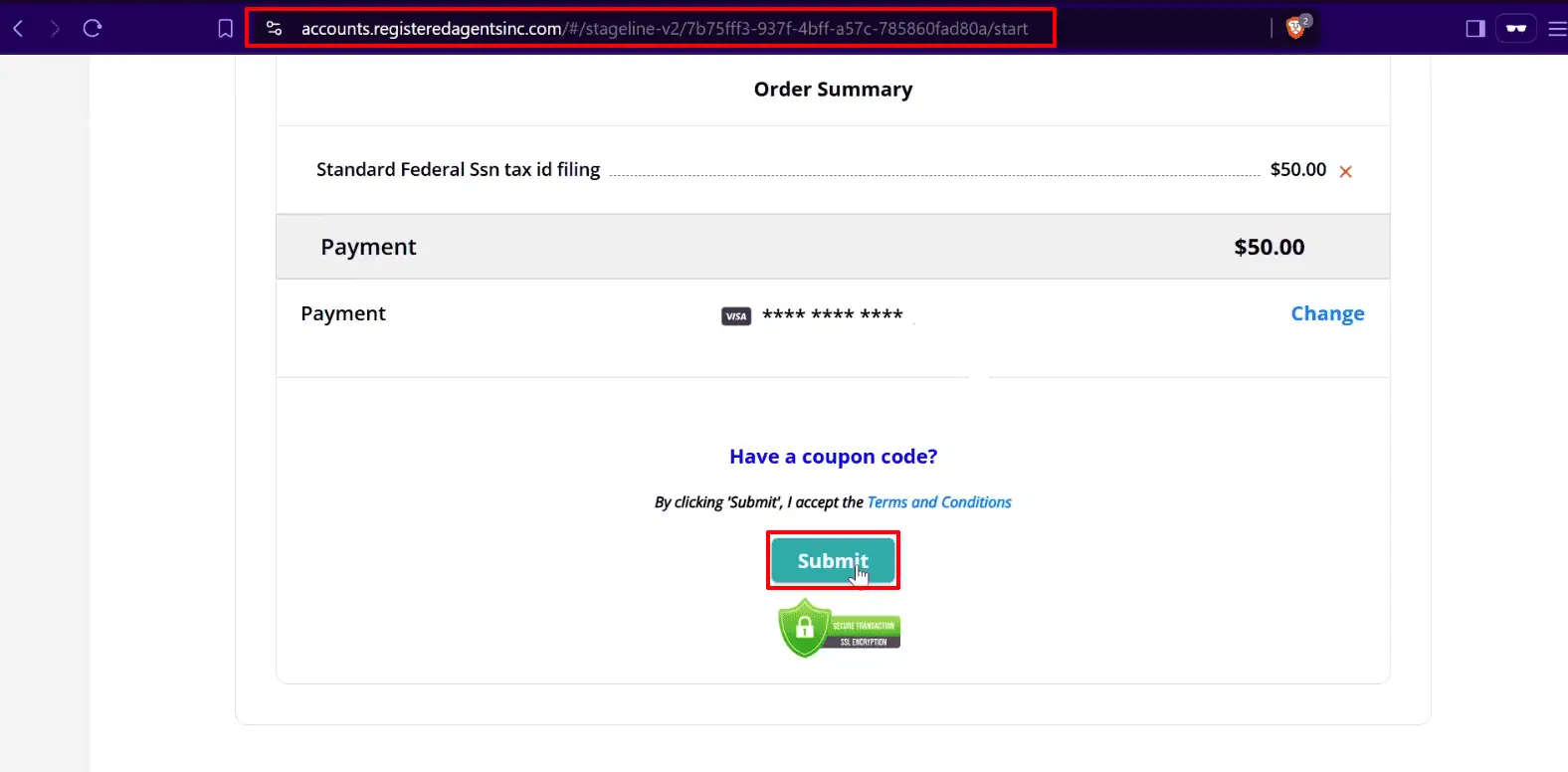
Review your details one last time and click Submit Order. That’s it! Your application is now officially filed. You will receive an email confirmation instantly, and typically within a few business days, your state formation documents and EIN status will be updated in your secure dashboard.
Step 7: Access Your Dashboard
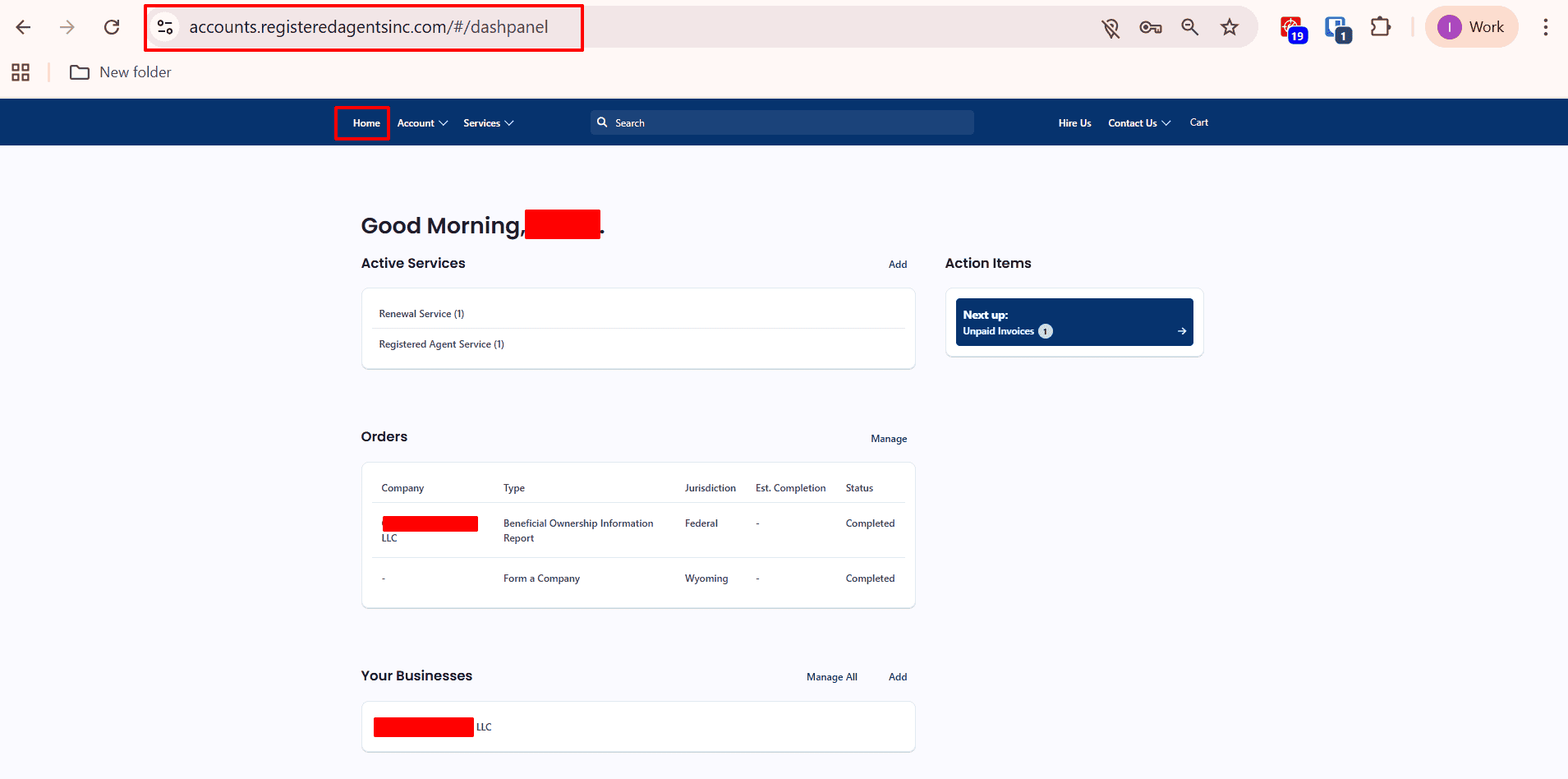
- Once your order is submitted, you will be redirected to your secure Registered Agent Dashboard.
- Active Services: You will see your “Registered Agent Service” and “Formation” status here.
- Status: Initially, it may say “Processing.” New Mexico is fast—approvals often happen within 1-3 business days.
Step 8: Download Your Documents
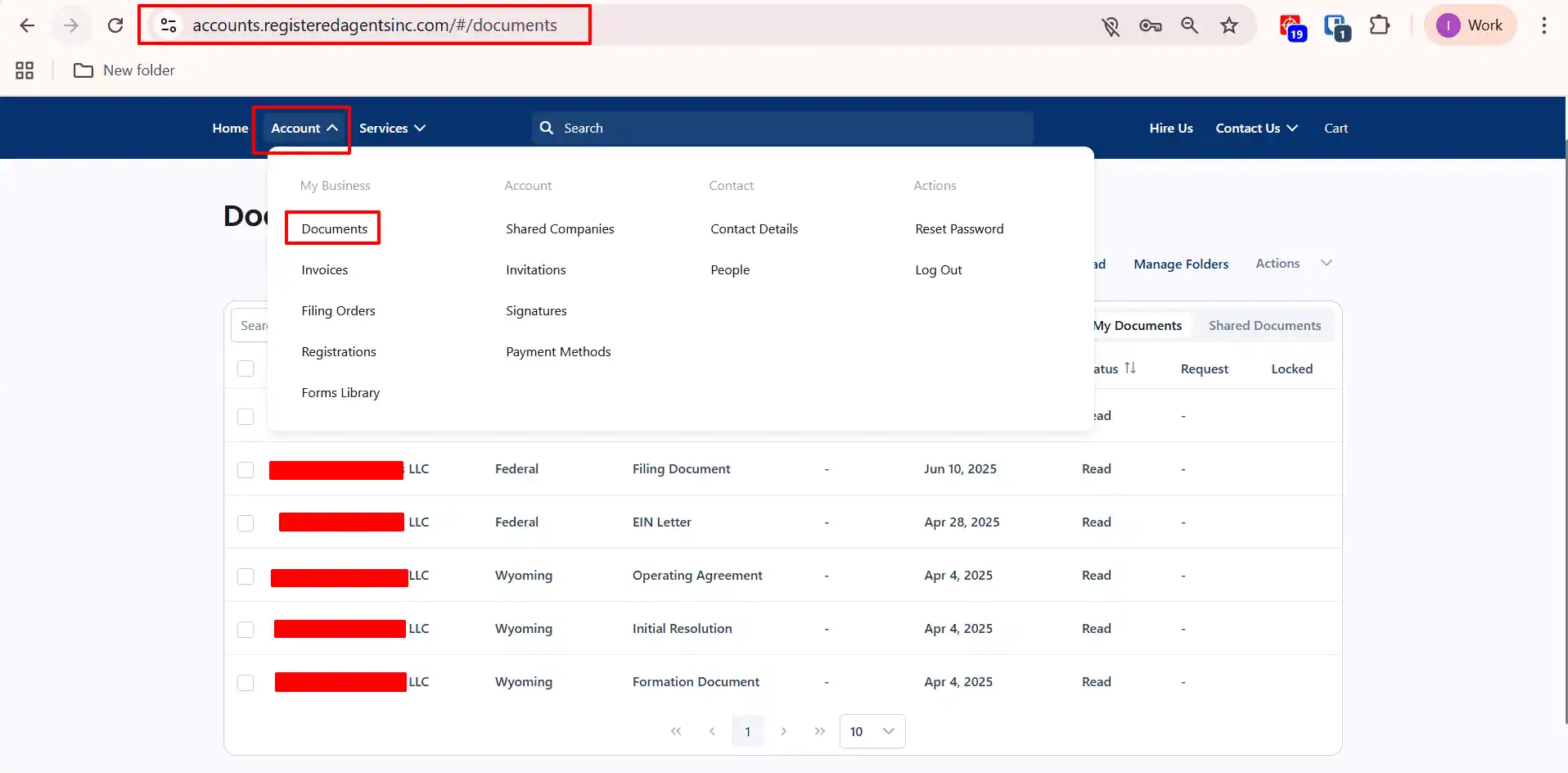
When New Mexico approves your LLC, you will receive an email. Log back into your dashboard and click the “Documents” tab.
You will find:
-
Articles of Organization: The official birth certificate of your company.
-
Operating Agreement: An internal document defining how your company is run (Banks like Mercury will ask for this).
-
EIN Letter: (Once processed by the IRS) This is the “Golden Ticket” you need to apply for Stripe and Bank Accounts.
Next Steps for Your New LLC:
Congratulations! You have successfully formed a US company from the comfort of your home.
-
Wait for the EIN: This can take few business days depending on IRS backlog for non-residents. Though the IRS’s official timeframe is only 1-4 business days.
-
Open a Bank Account: Use your new LLC documents and EIN to apply for a business account. For non-residents, I highly recommend Mercury Bank because they allow remote opening.
-
Set Up Payments: Connect your US bank account to Stripe or Amazon Seller Central to start accepting payments globally.
- Build Your Website: For a fast AI-powered website builder that works great for US businesses, I recommend Hostinger. They also provide quality web hosting and .com domains.
Ready to start?
Launch Your LLC with Registered Agents Inc.
Disclaimer: LLCTutor.com is an educational platform and does not provide legal or financial advice. We promote lawful and ethical business practices in line with Islamic principles. We do not support unlawful activities, deceptive practices, gambling, interest-based business models, or arrangements that lack real ownership, responsibility, or commercial risk. Viewers are responsible for ensuring their activities comply with applicable laws and ethical standards. And some links in this description are affiliate links. This means if you click on them and purchase a service, I may receive a small commission at no extra cost to you. I only recommend services I have personally used and trust. This helps support the blog/channel so I can continue to make free content like this!